
What is ERP Software and How It Works?
Disclaimer: This content is for educational purposes only. It does not provide professional, technical, or financial advice.
As organizations grow, they handle many activities at the same time—tracking money, managing employees, handling inventory, processing orders, and much more. Managing all this information separately can lead to confusion and mistakes. This is where ERP software comes into the picture.
This article explains what ERP software is and how it works in a simple, beginner-friendly way. If you are a student or new learner exploring SaaS and business software concepts, this guide is designed especially for you.
ERP Means?
ERP stands for Enterprise Resource Planning. While the term may sound complex, the idea behind it is quite simple.
ERP software is a centralized digital system that helps organizations manage different activities using one shared platform. Instead of using many separate systems, ERP software brings everything together.
Breaking Down the ERP Term
- Enterprise: Any organization, large or small
- Resource: People, money, materials, time, and data
- Planning: Organizing and coordinating activities efficiently
In short, ERP software helps organizations plan and manage their resources using one connected system.
Why ERP Software Exists
Before ERP software, different departments often used different tools. For example, finance teams tracked money in one system, while inventory teams used another. This caused data gaps, repeated work, and delays.
ERP software was created to solve these problems by:
- Reducing duplicate data entry
- Keeping information consistent across departments
- Improving coordination and communication
- Providing a single source of truth
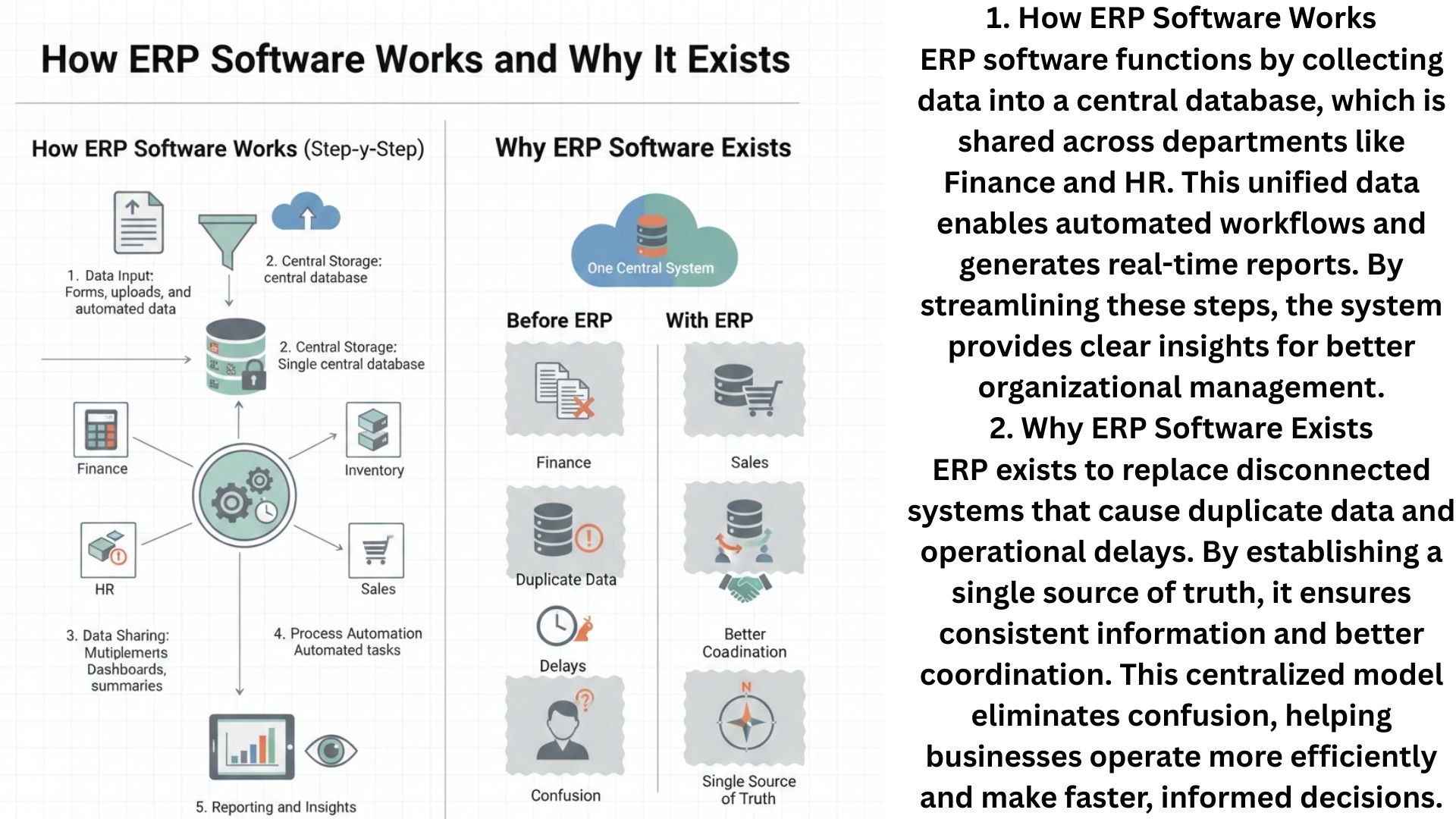
ERP exists to replace disconnected systems that cause duplicate data and operational delays. By establishing a single source of truth, it ensures consistent information and better coordination. This centralized model eliminates confusion, helping businesses operate more efficiently and make faster, informed decisions.
ERP software connects different parts of an organization into one shared digital environment.
Core Areas Covered by ERP Software
ERP software usually covers multiple functional areas. Each area focuses on a specific type of activity, but all share the same database.
| ERP Area | What It Manages |
|---|---|
| Finance | Budgets, expenses, payments, and records |
| Human Resources | Employee details, attendance, and roles |
| Inventory | Stock levels, materials, and movement |
| Operations | Daily processes and internal workflows |
| Reporting | Summaries and performance insights |
Because all these areas are connected, changes in one area are reflected across the system.
How ERP Software Works: Step-by-Step
Understanding how ERP software works becomes easier when we look at the flow of information.
Step 1: Data Input
Information is entered into the system through forms, uploads, or automated processes.
Step 2: Central Storage
All data is stored in a single shared database instead of multiple disconnected systems.
Step 3: Data Sharing
Different departments access the same data based on their needs and permissions.
Step 4: Process Automation
Routine tasks, such as calculations or updates, are handled automatically by the system.
Step 5: Reporting and Insights
Users can view summaries and trends to understand what is happening across the organization.
ERP Software and SaaS: The Modern Connection
Many ERP systems today are delivered using the SaaS (Software as a Service) model. This means the software is accessed through the internet rather than installed on local computers.
From a learning perspective, this is important because SaaS-based ERP software:
- Uses cloud technology
- Allows access from different locations
- Updates automatically without manual effort
- Introduces students to modern software architecture
Educational platforms like IBM often explain ERP systems as real-world examples of SaaS-based enterprise software.
Simple Example to Understand ERP Software
Imagine a small organization with 10 employees. One team records expenses, another tracks materials, and another handles employee attendance.
Without ERP software, each team uses separate spreadsheets. If an employee leaves, multiple files must be updated.
With ERP software:
- The employee record is updated once
- All departments see the change instantly
- No repeated updates are required
This example shows how ERP software reduces confusion and improves accuracy.
Educational Benefits of Learning ERP Software Concepts
Learning about ERP software helps students understand how large systems manage data and processes. It introduces concepts such as integration, centralized databases, and SaaS delivery models.
ERP software is a practical example of how technology simplifies complex organizational systems.
FAQs
What is ERP software in simple terms?
ERP software is a system that helps organizations manage different activities using one shared platform.
Is ERP software related to SaaS?
Yes, many modern ERP systems are delivered using the SaaS model through the internet.
Do students need technical skills to learn ERP concepts?
No, basic computer knowledge is enough to understand ERP concepts at a beginner level.
Is ERP software only for large organizations?
ERP concepts can apply to organizations of different sizes, including small teams.
Why is ERP software important to study?
It helps learners understand real-world examples of integrated software and SaaS systems.